Classifications | View#
When entities are assigned classifications, you can:
View classifications#
In entity tables#
To show the TTP Classification column in the entity listing view if it is not visible:
On the right side of the table header, select the
 Settings icon.
From the Customize list columns modal, select TTP Classification.
Select Save.
In entity detail pane#
Open an entity’s detail pane.
In the entity modal, go to the Overview tab.
The assigned classifications are displayed in the TTP Classification section.
In the graph#
From the graph top menu bar, select TTP Classification.
Enable the Show TTP Classifications toggle.
By default, classifications appear as a list below each entity node in the graph.
The following additional options become available:
Show as Objects: Displays classifications as individual objects in the graph instead of a list below each entity. Select a classification object to open a modal with a short description. Select Read More to open the classification’s page on the framework website.
Show Name: Displays the full classification name instead of just the ID.
Framework filter: Filter which classifications are shown in the graph by framework (e.g. MITRE ATT&CK or DISARM).
Search and filter entities through assigned classifications#
Filter on classifications#
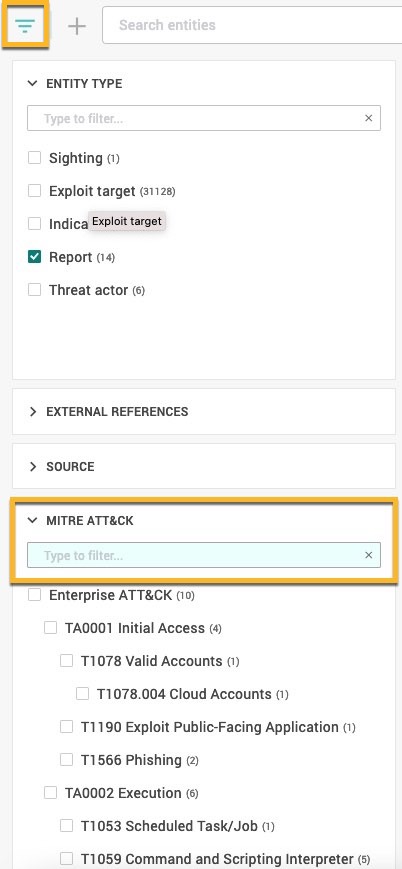
You can filter entity tables by framework classifications.
In any entity table, select
 Filter in the top-left.
Expand the relevant framework section (e.g. MITRE ATT&CK or DISARM).
Start typing to search for a classification.
Select one or more classifications from the list to filter results by.
Search for classifications#
When creating search queries, you can include classifications as filters to find entities with those classifications.
To construct a query including classification ID filters:
From the left sidebar, select
 Search and Browse
and open the Entities tab.
Search and Browse
and open the Entities tab.
You can include classifications in both simple and relational queries.In the Search entities field, enter
meta.attack.id: <TTP_ID>ormeta.attack.id.keyword: <TTP_ID>.TTP_ID specificity
Including
meta.attack.id: <TTP_ID>is non-literal, i.e. searching forTA0001would return entities classified withTA0001andTA0001:TXXXX. Searching forT1098would returnTA0001:T1098andTA0011:T1098.meta.attack.id.keyword: <TTP_ID>is literal; searching forTA0001would return entities classified withTA0001. Searching forT1098would return nothing as it does not exist without a tactic scope.(Optional) To include multiple classifications, repeat steps 2 and 3, using
AND/ORoperators between filters.(Optional) Complete your query with other filters.
Run the query by selecting
.